Logitech Audio Controller Settings
The audio controller needs to be set up so that it looks like the picture below.
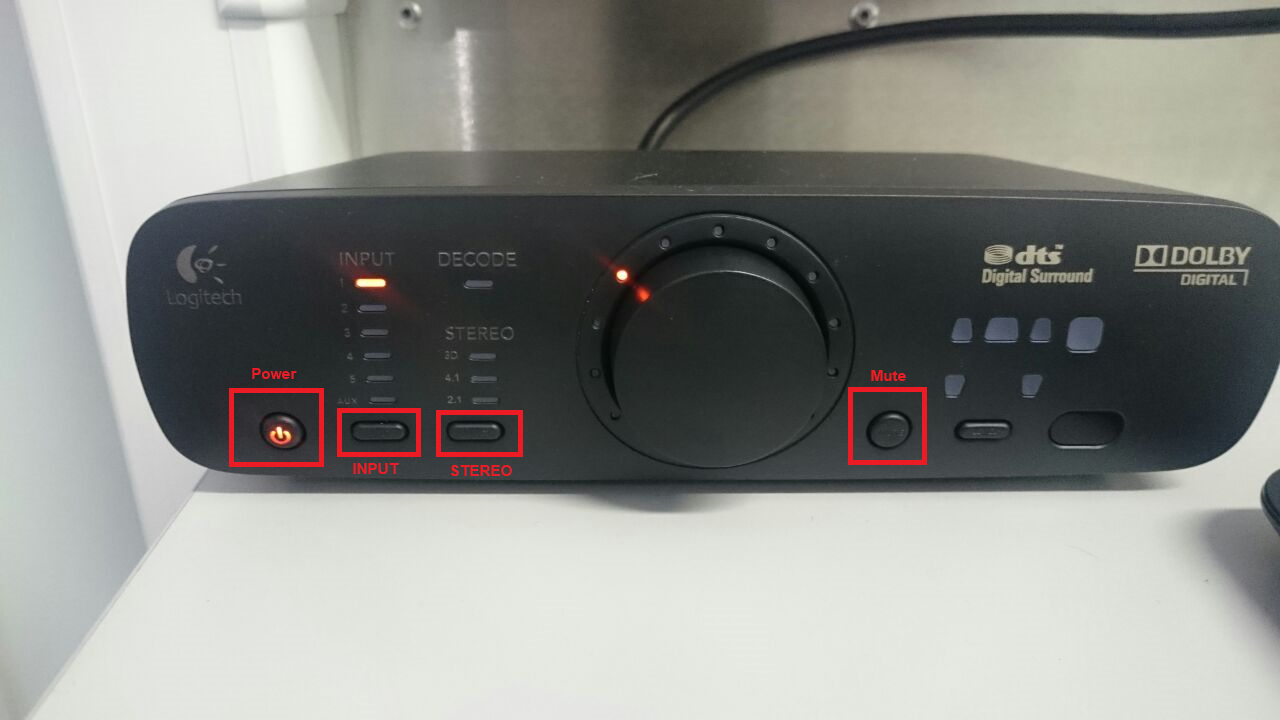
- Press the Power button to turn the audio controller on.
- Press the Input button so that the Input LED is set to Position 1.
- Press the Stereo button so that the Stereo LED is not shown.
- Press the Mute button to ensure the sound is not muted.
Related Articles
Nvidia 3D Settings
All simulator PCs should have the same Nvidia 3D Settings. To change the settings, follow the steps below: Right click anywhere on the desktop and then choose the NVIDIA Control Panel option. You may need to select "Show more options before the ...Gigabyte Motherboard AC BACK BIOS Settings
Follow the steps below in order to make sure the simulation computer starts up automatically when power is provided to the simulator system. Press DEL while the PC is booting up to enter the BIOS. Navigate to the Power tab. Ensure AC BACK is set to ...VR Simulation Performance Drops Suddenly
If the performance of a VR system suddenly drops and the PC starts to respond slowly resulting in a stuttering simulation with low frame rate, check if GPU and VRAM usage in Task Manager. If the VRAM usage is above 90%, the issue could be that ...Multimon SBS Crash
Multimon SBS Crash: Condition: SetDisplayDimensions(pDisplay, aDisplays) Message: CMultiMon::SetConfiguration: Dimensions not found for display Multimon configuration settings incorrect - SimCAB display PC was connected to the multimon network when ...